1. Problem Statement
You are given a list of K arrays. Each array is already sorted in ascending order. Your task is to merge all K arrays into a single array that is also sorted in ascending order, and return this final array.
Input: A list of K sorted arrays (e.g., a 2D array or a list of lists).
Output: A single 1D array containing all elements from the input arrays, sorted in ascending order.
Constraints & Clarifications:
- "Sorted arrays" means: Elements are in non-decreasing order. An element is less than or equal to the element on its right.
- Different lengths: Yes, the arrays can be of entirely different sizes, including empty arrays.
- Duplicates: Yes, duplicate values can exist both within a single array and across multiple arrays.
Example:
- Array 1:
[1, 4, 5] - Array 2:
[1, 3, 4] - Array 3:
[2, 6] - Output:
[1, 1, 2, 3, 4, 4, 5, 6]
2. Brute Force Solution
Intuition
If we don't know how to merge multiple arrays simultaneously, the simplest approach is to ignore the fact that they are already sorted. We can just dump every single element into one giant array and sort it from scratch.
Algorithm:
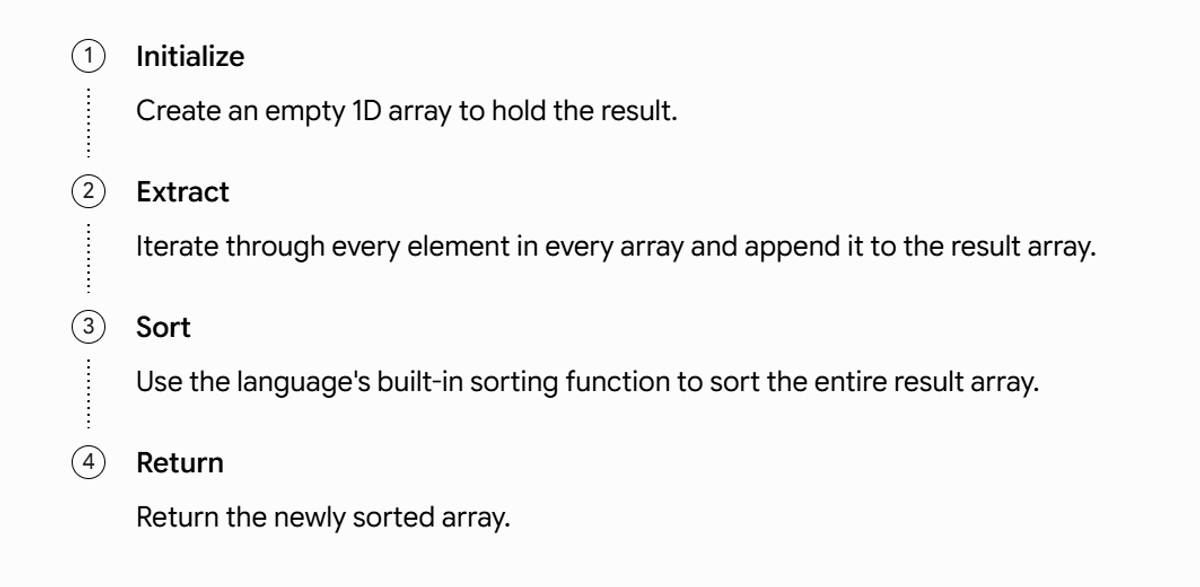
Dry Run
- Input:
[[1, 4], [2, 5], [3]] - Extraction:
[1, 4, 2, 5, 3] - Sorting:
[1, 2, 3, 4, 5] - Output:
[1, 2, 3, 4, 5]\
#include <vector>
#include <algorithm>
class SolutionBrute {
public:
std::vector<int> mergeKArrays(std::vector<std::vector<int>>& arrays) {
std::vector<int> result;
for (const auto& arr : arrays) {
for (int num : arr) {
result.push_back(num);
}
}
std::sort(result.begin(), result.end());
return result;
}
};
Line-by-line Explanation
std::vector<int> result;: Creates the container for our final merged array.for (const auto& arr : arrays): Loops through each individual sorted array.for (int num : arr): Loops through each integer inside the current array.result.push_back(num);: Appends the integer to our 1D result vector.std::sort(result.begin(), result.end());: Sorts the aggregated data in O(NlogN) time.return result;: Yields the final output.
Complexity Analysis
- Time Complexity: O(NlogN), where N is the total number of elements across all K arrays. Extracting takes O(N), and sorting takes O(NlogN).
- Space Complexity: O(N) to store the final combined array. (Ignoring the output array, it requires O(logN) auxiliary space for the sorting algorithm).
Advantages
- Extremely simple to implement and understand.
- Requires minimal code.
Disadvantages
- Completely ignores the fact that the input arrays are already sorted.
- Highly inefficient for large datasets due to the O(NlogN) sorting step.
3. Better Solution (Sequential Merging)
Intuition
Merging two sorted arrays is a classic, efficient operation that takes linear time using two pointers. What if we just merge the arrays one by one? We can maintain a "running merged array" and repeatedly merge the next array into it.
Algorithm:
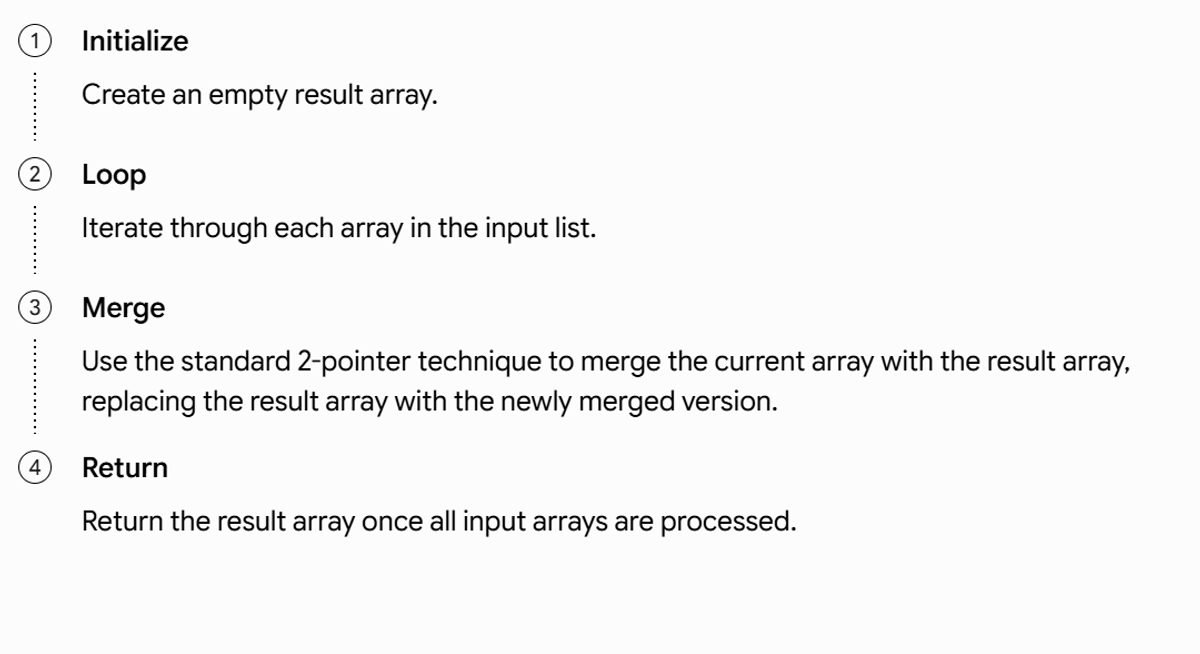
Complete Dry Run
- Input:
[[1, 5], [2, 4], [3, 6]] - Initial
result = [] - Merge
[] and [1, 5] → result = [1, 5] - Merge
[1, 5] and [2, 4] → result = [1, 2, 4, 5] - Merge
[1, 2, 4, 5] and [3, 6] → result = [1, 2, 3, 4, 5, 6]
#include <vector>
using namespace std;
class SolutionSequential {
private:
vector<int> mergeTwo(const vector<int>& a, const vector<int>& b) {
vector<int> merged;
int i = 0, j = 0;
while (i < a.size() && j < b.size()) {
if (a[i] <= b[j]) {
merged.push_back(a[i++]);
} else {
merged.push_back(b[j++]);
}
}
while (i < a.size()) merged.push_back(a[i++]);
while (j < b.size()) merged.push_back(b[j++]);
return merged;
}
public:
vector<int> mergeKArrays(vector<vector<int>>& arrays) {
if (arrays.empty()) return {};
vector<int> result = arrays[0];
for (size_t i = 1; i < arrays.size(); ++i) {
result = mergeTwo(result, arrays[i]);
}
return result;
}
};
Complexity Analysis
- Time Complexity: O(N×K). In the worst case, if every array has N/K elements, the first merge processes 2N/K elements, the second 3N/K, and so on. This arithmetic progression sums to roughly O(N×K), which is dangerously slow if K is large.
- Space Complexity: O(N). We constantly create temporary merged arrays up to size N.
Advantages
- Actually utilizes the fact that the input arrays are sorted.
- Does not require complex data structures.
Disadvantages
- Time complexity degrades terribly as the number of arrays (K) grows. Elements from the first array are copied K−1 times!
Why We Still Need Something Better
Moving elements repeatedly is a massive bottleneck. We need a way to look at the "front" of all K arrays simultaneously and pick the absolute smallest one instantly, without moving data multiple times.
4. Optimal Solution (Min Heap / Priority Queue)
Intuition
At any given moment, the smallest unmerged element must be the first element of one of the K arrays.
If we have K arrays, there are K "front" elements competing to be the next smallest value in our final array. We only need a data structure that can efficiently maintain these K candidates, instantly give us the minimum, and quickly insert a new candidate when one is removed. A Min Heap (Priority Queue) is the perfect fit.
Key Observations
- Every array is already sorted. We don't need to look at the second element of an array until the first element is processed.
- The first element is the smallest remaining. The smallest element in the entire unmerged dataset must be one of the current "first" elements of the K arrays.
- Replacement. When we take the smallest element from the heap and add it to our result, we just replace it in the heap with the next element from that exact same array.
Why Min Heap?
- Why not a Max Heap? A Max Heap keeps the largest element at the top. We are sorting in ascending order, so we need the smallest element at the top.
- Why not repeatedly sort the K elements? Sorting a K-sized array takes O(KlogK). Finding the minimum by scanning takes O(K). A Min Heap gives us the minimum in O(1) and takes only O(logK) to insert the next element.
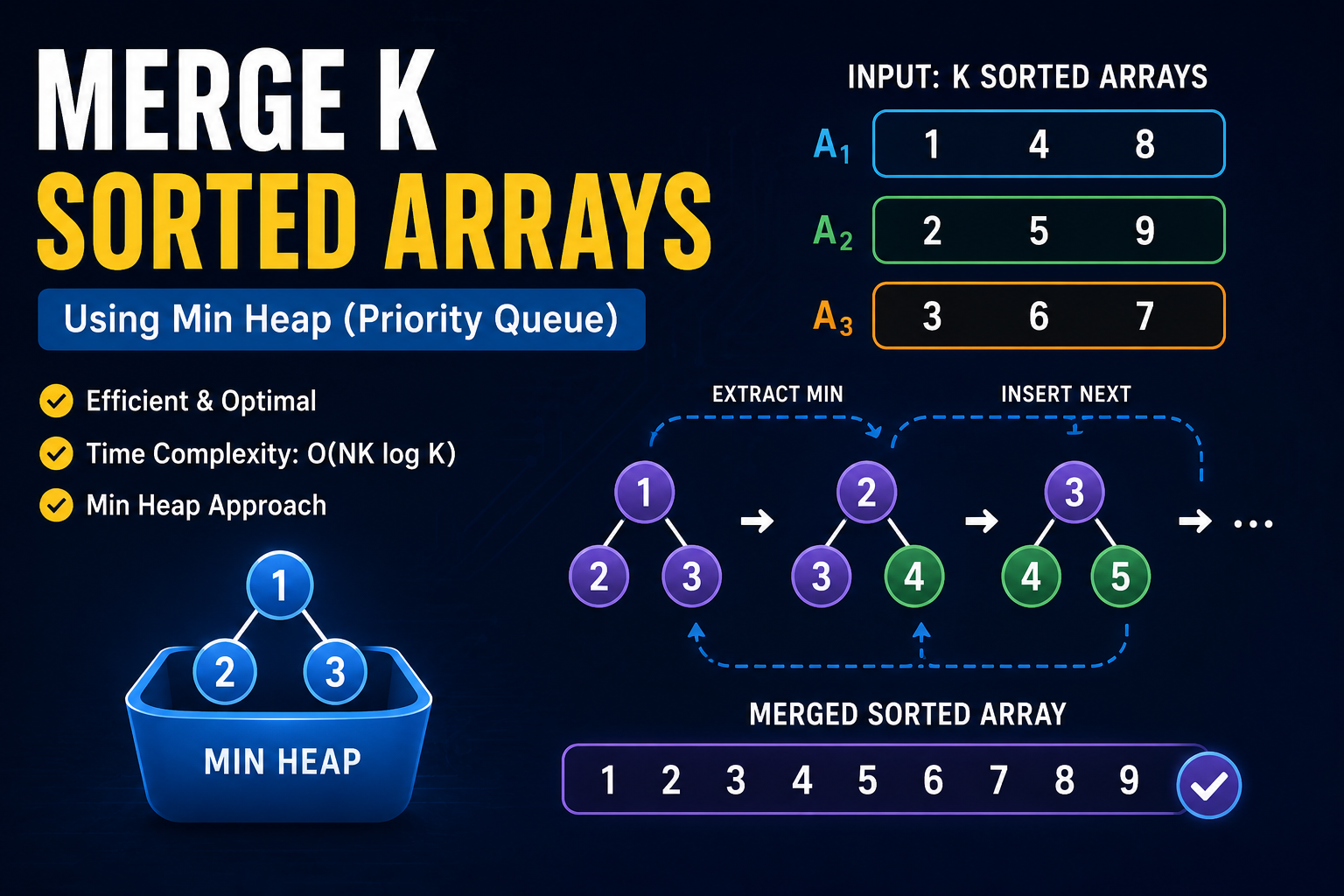
ASCII Diagram of Heap logic:
Imagine three arrays:
Array 1: 1, 4, 8
Array 2: 2, 5, 9
Array 3: 3, 6, 7
Initial Min Heap contains the first element of each:
1  (from Array 1)
     / \
    2   3 (from Arrays 2 & 3)
Pop 1, add to result. The next element in Array 1 is 4. Insert 4 into the heap:
2  (from Array 2)
     / \
    3   4 (from Arrays 3 & 1)
Algorithm
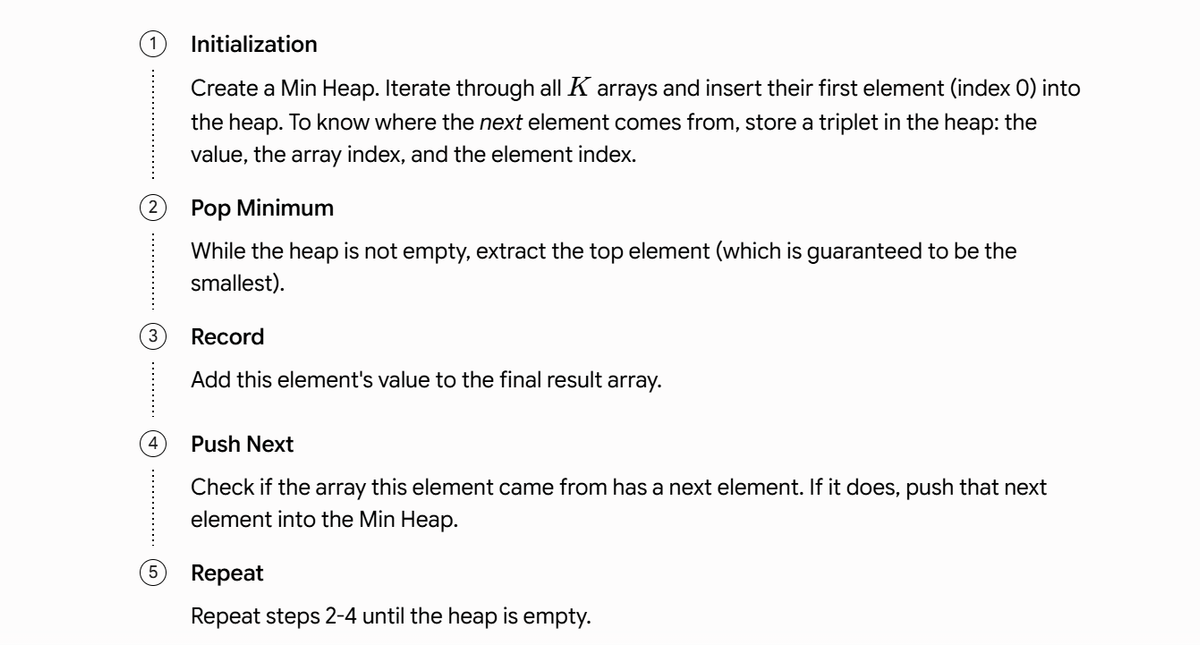
c++ code:
class Solution {
public:
vector<int> mergeKArrays(vector<vector<int>> arr, int K) {
vector<int> result;
struct Node {
int value;
int arrayIndex;
int elementIndex;
};
struct Compare {
bool operator()(Node &a, Node &b) {
return a.value > b.value;
}
};
priority_queue<Node, vector<Node>, Compare> minHeap;
for (int i = 0; i < K; i++) {
if (!arr[i].empty()) {
minHeap.push({arr[i][0], i, 0});
}
}
while (!minHeap.empty()) {
Node current = minHeap.top();
minHeap.pop();
result.push_back(current.value);
int nextIndex = current.elementIndex + 1;
if (nextIndex < arr[current.arrayIndex].size()) {
minHeap.push({
arr[current.arrayIndex][nextIndex],
current.arrayIndex,
nextIndex
});
}
}
return result;
}
};
5. Complete Dry Run
Input Arrays: 0: [1, 4, 8] 1: [2, 5, 9] 2: [3, 6, 7]
Note: Heap contents shown as (value, array_index, element_index)
+
| Action | Removed Element | Inserted | Current Heap | Current Result Array |
+
| Initialization | None | (1,0,0), (2,1,0), | [(1,0,0), (2,1,0), (3,2,0)] | [] |
| | | (3,2,0) | | |
+
| Iteration 1 | (1,0,0) | (4,0,1) | [(2,1,0), (3,2,0), (4,0,1)] | [1] |
+
| Iteration 2 | (2,1,0) | (5,1,1) | [(3,2,0), (4,0,1), (5,1,1)] | [1, 2] |
+
| Iteration 3 | (3,2,0) | (6,2,1) | [(4,0,1), (5,1,1), (6,2,1)] | [1, 2, 3] |
+
| Iteration 4 | (4,0,1) | (8,0,2) | [(5,1,1), (6,2,1), (8,0,2)] | [1, 2, 3, 4] |
+
| Iteration 5 | (5,1,1) | (9,1,2) | [(6,2,1), (8,0,2), (9,1,2)] | [1, 2, 3, 4, 5] |
+
| Iteration 6 | (6,2,1) | (7,2,2) | [(7,2,2), (8,0,2), (9,1,2)] | [1, 2, 3, 4, 5, 6] |
+
| Iteration 7 | (7,2,2) | None (End of Arr 2) | [(8,0,2), (9,1,2)] | [1, 2, 3, 4, 5, 6, 7] |
+
| Iteration 8 | (8,0,2) | None (End of Arr 0) | [(9,1,2)] | [1, 2, 3, 4, 5, 6, 7, 8] |
+
| Iteration 9 | (9,1,2) | None (End of Arr 1) | [] | [1, 2, 3, 4, 5, 6, 7, 8, 9] |
+
6. Correctness Proof
Why does this algorithm confidently produce a completely sorted array?
- The Subproblem Invariant: At any step, the Min Heap contains exactly one element from each array (unless that array has been completely processed). Specifically, it contains the smallest unprocessed element of each array.
- The Global Minimum Guarantee: Because every array is sorted, no unprocessed element in an array can be smaller than the element currently in the heap from that same array. Therefore, the smallest element in the heap is definitively the smallest unprocessed element across all arrays.
- State Transition: When we remove the global minimum, we safely append it to our result array. Replacing it in the heap with the next element from its native array restores the subproblem invariant for the next cycle.
- Conclusion: Because we always pick the absolute minimum of the remaining elements at every step, the resulting array is built in strict ascending order.
7. Complexity Analysis
- Initialization Complexity: O(KlogK) to insert the first element of each of the K arrays into the heap. (This can be optimized to O(K) using a heapify operation, though consecutive pushes are acceptable).
- Heap Insertion/Deletion Complexity: O(logK). The heap never grows larger than K elements.
- Overall Time Complexity: O(NlogK). We process every single element exactly once. There are N total elements. For each element, we perform an extraction and an insertion on a heap of size K. This takes N×O(logK)=O(NlogK).
- Overall Space Complexity: O(K) auxiliary space. The Min Heap stores at most K elements at any given time. We also need O(N) space for the output array, but this is required by the prompt's return type and usually not counted against the algorithmic space footprint.
Why O(logK) instead of O(logN)? We only keep track of one candidate per array. The heap size is strictly bounded by K (number of arrays), not N (total elements).
8. Edge Cases
- Empty list of arrays: The input
[] should immediately return an empty array. - Empty arrays inside the list: Arrays like
[[], [1, 2], []] must be handled. Skip empty arrays during initialization so you don't push null/garbage values into the heap. - Single array:
[[1, 2, 3]]. The heap will have size 1, pop and push sequentially, returning the exact same array. - One element in every array: K arrays of size 1. This devolves into standard heap sort taking O(KlogK).
- Duplicate values: The heap allows duplicate values naturally. The comparator will break ties arbitrarily, which is fine since identical values can appear in any order.
- Negative numbers: Min Heap arithmetic inherently handles negative numbers correctly.
- Arrays of different lengths: The logic checks bounds before pushing the next element, effortlessly handling staggering lengths.
- Very large K / Very large N: The O(NlogK) scales beautifully compared to O(NlogN) sorting.
9. Common Interview Mistakes
- Forgetting to store the array and element index: Pushing only the value into the heap means when you pop it, you have no idea which array to pull the next element from.
- Pushing the wrong next element: Accidentally pushing
arrays[array_index][element_index] instead of arrays[array_index][element_index + 1], causing an infinite loop. - Using a Max Heap: C++
priority_queue is a Max Heap by default. Forgetting to pass greater<> results in a descending array of the wrong elements. - Incorrect loop conditions / Out-of-bounds: Failing to check if
element_index + 1 < arrays[array_index].size() before pushing the next element causes segmentation faults. - Assuming all arrays have equal length: Writing a
for loop up to a fixed length M will crash on jagged arrays.
Video reference:
problem link:
https://www.naukri.com/code360/problems/merge-k-sorted-arrays_975379